
Wateen Connector is one of my projects that got me interested in Visual Studio .NET – some of the team members at CyberPK helped and contributed to this small utility.
I actually made this on a request from a CyberPK’s Loyal and Regular user, I didn’t thought that other users would be experiencing the same problem like him, Until i recently fell into it myself. It sure is annoying, having to keep logging in to your Wateen WiMAX account – so Wateen Connector was created. Wateen Connector is Exclusively made for Wateen WiMAX users.
About Pakistan’s Wateen Telecom
Wateen Telecom is a Internet Service Provider in Pakistan, its a new venture of Warid Telcom – Wateen Telecom established one of the largest country-wide WiMAX Network in the world.
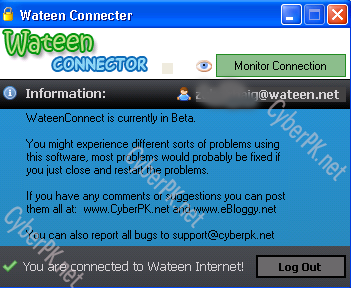
Wateen Connector lets you log into your Wateen Services as you usually do. The extra features that you get is that Wateen Connector allows you to Monitor your internet connection and if it goes down it will let you know about it, And will ask if you like to keep monitoring it. If you set monitoring on you will be notified as soon as you disconnect or get connected – Wateen Connector also has a Auto-Login feature that logs you into your Wateen Account easily and effort-lessly!.
Wateen Connector now lets you chat with other Wateen users using the chat services implemented on our website. One of the useful features that we added was the ability to view your bandwidth usage from the application.
For complete detail and information visit Wateen Connector’s Homepage.



Leave a Reply